Made2Manage ERP

×

Get your free demo of Made2Manage ERP.

We just need some facts about your organization:

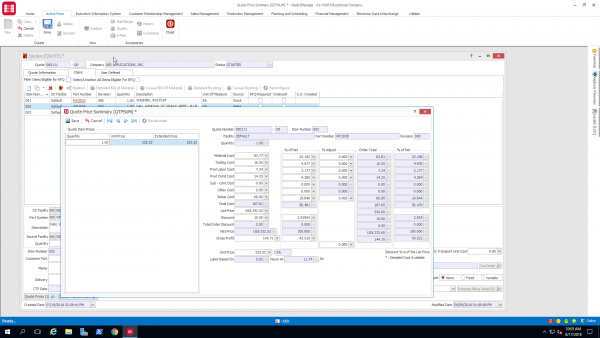
Aptean Made2Manage ERP is designed for manufacturers in job shops and dynamic “to-order” and mixed-mode environments. It's suitable for SMB manufacturers in industries like industrial equipment, electronics and fabricated metal, and Made2Manage can support a mix of make-to-order, assemble-to-order, make-to-stock and engineer-to-order manufacturing methods.

Core areas of functionality include quoting, planning and scheduling, procurement, engineering management, manufacturing, inventory management and finance. Made2Manage is intended to coordinate all business processes within the organization.

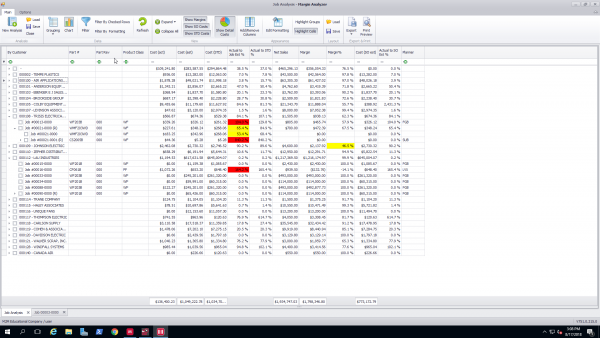
Features include real-time planning and scheduling, actual job costing, shop floor execution features and lot and serial number traceability. It can deliver full business intelligence reports with the option to drill down to specific data. Integration with CAD engineering tools helps manage BOM data, and a built-in customer relationship management (CRM) component with Microsoft Outlook integration helps manage account information and interactions with customers and prospects.

Made2Manage offers a range of configuration options, allowing businesses to customize forms and menus, control user access rights and modify workflows to support operations across different locations or subsidiaries.
Lights
Lights
Lights
Lights
Lights

9 Reviews of Made2Manage ERP

Average User Ratings

Overall

Ease-of-use

Value for money

Customer support

Functionality

2.8 / 5 stars

Ratings Snapshot

5 stars

4 stars

3 stars

2 stars

1 stars

(4)

(12)

(7)

(5)

(2)

Made to Manage more like Made to Damage

Date Posted: October 2018

Andrea

Abode Construction

Review source:
Software Advice

2/5


Overall

Ease of Use


Features & Functionality

Customer Support


Value for Money
Comment: In 2006 the company I worked for was sold M2M as a ERP system that would make our business paperless (mostly) We killed more trees after installing it. The notifiers were less than helpful and most users stopped looking at them because the information was useless. When it came to digesting information in the system to make sense of what are actual inventory #'s were or job statuses we had to have a programmer write a script that pulled the info from M2M and redesigned it into something legible using Excel. He finally wrote the script to include BOM (parent/children) where used, pick tickets for each machine build or job running through our machine shop as well as parts orders. The features we needed were just not there. So they promised it would fix it in the next update, then the next one and next until we on 6.5 which crashed our network (some type of bug) The field service module which was purchased as an addition did also not work as promised. All BOM would have to be loaded in order to create a service case, then create a sales order or work order from there.

Pros: M2M is very easy to learn and easy to navigate. Can be customized but for a price. If there are other users in your area M2M offers user group meetings that can be very informational. They also have M2M university which is a series of in depth how to's on the various functions within the system. Can set each user to only have access to things pertaining to their job function within the company.

Cons: Not a paperless system!! Reporting is awful. Newest version allows for too many mistakes. Areas that should not be able to be edited are still open once saved; including the inventory screen! After latest update UPS Worldship interface no longer worked. Sure they offer customization however unless they have an overwhelming demand for the feature your company may need to do business the charges to write the script and update your version are high. When sending a service trouble shooting ticket do not expect an answer right away. It typically takes there service team several days to respond and most of the time the answer is we need to look further into it.

Date Posted: August 2013

Chuck

RenewAire, LLC

Review source:
Software Advice

1.3/5


Overall

Ease of Use


Features & Functionality

Customer Support


Value for Money
Comment: We are a manufacturer of Energy Recovery Ventilation systems. We had no centralized ERP system when we chose M2M in 1999. We chose the system because it was among the most all inclusive of our choices at that time, meaning all of the modules were made by the same company, not several "bolt on third party" options. Prior to implementing we used a variety of spreadsheets. We are currently on version 6.01 SP3. Initial installation went reasonably well, except the "in house" M2M implementer was not very qualified and we switched to a very competent 3rd party implementer. We now have 13 years of experience with the software. I don't think anyone would call it "easy" or "Intuitive". It would be more described as "arcane" and "non-intuitive". We are always reluctant to upgrade because every time we have things that have been working are now broken. For example V6 was introduced with major flaws in the CSR/RMA process - a true downgrade from V5.x. Customer support has never been good and has gotten worse. The knowledge base/on-line information is not as user friendly as it has been before. Generally, the first line tech that may takes the initial call is not as familiar with M2M as our IT staff. Higher level techs know what they are doing, but it sometimes takes some hand holding and requesting to get the problem bumped up to the higher tech level. As said, we originally bought the software because it was all inclusive, but that is not the case any more. We use Advanced Configurator, Advanced Reporting, and Bar Code, the first two being third party software. We have had problems with Configurator and Reporting, and the M2M staff is much less knowledgeable about these but we had to go through M2M channels to finally reach the people who know how to solve our problems. One recent example, Advanced Confitgurator did not run on Windows 7 64 bit machines. We had a ticket open more than 8 months and M2M never solved the problem. We finally got it solved by paying a 3rd party vendor and the issue was resolved within days.

Pros:

Cons:

Date Posted: August 2013

Paul

Taylor Valve Technology

Review source:
Software Advice

2.8/5


Overall

Ease of Use


Features & Functionality

Customer Support


Value for Money
Comment: We have used M2M since October 2009. We were not satisfied with the time and effort required to maintain our prior system and the reporting was not user-friendly nor accurate. Looking back now, we are in a much better position in terms of business awareness, integration, and reporting. I like how all aspects of our business is incorporated into the ERP (order entry, procurement, accounting and scheduling) so we don't have separate databases for everything. We have had to introduce many new personnel to M2M, and although it has taken some time, we all feel very comfortable with the current system. Our heavy users are still trying to get additional tools out of the system but I think we will get there with time. I am the primary user of the support portal and I have mixed feelings. When I eventually get someone from tech support to assist on the case, they are usually well-informed and helpful. I would like to see support cases addressed more quickly, though. At times, it takes one to two days just to hear back from a tech support personnel even on high priority and urgent cases. At times, this has gotten us into trouble or slowed down our productive capacity. We look to uncover more tools and becoming more M2M savvy through the online material as well as seminars and other user contacts. Overall, we have been pleased with the experience and would recommend the product to companies similar to ours.

Pros:

Cons:

Made 2 Manage is a True Management Tool

Date Posted: September 2017

Pam

Alecom Metal Works, inc.

Review source:
Capterra

4.5/5


Overall

Ease of Use


Features & Functionality

Customer Support


Value for Money
Comment: As an admin and on site support for this software, I could not recommend a better solution to a med to large campany that is wanting to see the indepth view of their financials, operations, etc... It is more than most small businesses would need as there are much more approapriate solutions for the samll business out there that an ROI can be achieved in as little as a few months to 1 year.. M2M has constantly stayed current with providing updates and new releases releases that are driven by the

Pros: Where to start with M2M - The team of people are fabo, well knowledged and really know how to help you figure out how the best way to use the software to reap yourself the fastest ROI and provide you with all the data you could ever want.

Cons: Expensive, they say you get what you pay for, well this software is on the higher side but .... and I do mean but...... the skill level of the help you can get is well worth some of those extra expenses.

Great product for small to mid size manufacturers

Date Posted: August 2013

Lynn

CDI

Review source:
Software Advice

4.3/5


Overall

Ease of Use


Features & Functionality

Customer Support


Value for Money
Comment:

Pros: Manage your business from beginning to end. Outstanding support department. Product improvements are finally keeping pace with customer needs.

Cons: Licensing and support are expensive. It is also costly to implement optional modules. Consulting is also speedy but dependable and reliable.

Works fairly well and easy to extraction information in Microsoft Excel

Date Posted: June 2018

Ron

Orchard Machinery Corporation

Review source:
Software Advice

1.8/5


Overall

Ease of Use


Features & Functionality

Customer Support


Value for Money
Comment:

Pros: Functionality is basically the same throughout all areas of the system. Report go to excel spreadsheets very easily

Cons: A lot of redundancy and many necessary steps to accomplish one task. Would be nice to be able to have some of the steps streamlined.

M2M ver 7

Date Posted: March 2018

Jerry

American Polywater Corp

Review source:
Software Advice

4.3/5


Overall

Ease of Use


Features & Functionality

Customer Support


Value for Money
Comment:

Pros: Good product overall, been a long journey to get off VFP, but they are getting there. Support is great and gets you the answers needed.

Cons: Maintenance is costly. Not a cheap program. Interface is dated. could use a face lift to more modern look.

Hired to migrate M2M from 7.0 to 7.5 w/Advanced Planning & Scheduling

Date Posted: July 2016

Alex

Orchard Machinery

Review source:
Software Advice

2.8/5


Overall

Ease of Use


Features & Functionality

Customer Support


Value for Money
Comment:

Pros: M2M has most of the functionality and reports needed to run a manufacturing operation, including Shop Floor Manager that helps to monitor activity on the production floor.

Cons: At the 7.0 level there are problems with MRP weekly buckets and reports are difficult to modify (still in MS VFP). The quality of the tutorials varies from subject to subject. Managing parts at multiple locations is very cumbersome as you are required to create a new part # for each part at each off-site location. Customer support can be spotty and the cost for custom reports is quite expensive.

Made 2 Manage Review

Date Posted: March 2019

Ron

Orchard Machinery Corporation

Review source:
Software Advice

1.8/5


Overall

Ease of Use


Features & Functionality

Customer Support


Value for Money
Comment:

Pros: Has all the functions needed for our business

Cons: On many occasions there are redundant steps needed to accomplish on function